The Gentlemen is a ransomware and data extortion group that has been active since July 2025. The group employs a double-extortion model, combining file encryption with data exfiltration and leveraging a dedicated leak site to pressure victims into payment. It demonstrates mature tradecraft, including extensive reconnaissance using custom tools, abuse of Group Policy Objects (GPO) for domain-wide deployment, and encrypted data exfiltration via tools such as WinSCP.
The ransomware supports Windows, Linux, and ESXi environments, with the Windows variant written in Go and requiring a password argument to initiate encryption. The password is plaintext hardcoded in the binary. The Gentlemen leverages multiple defense evasion techniques, including disabling Windows Defender, deleting Volume Shadow Copies, and abusing legitimate drivers. Its RaaS model and use of living-off-the-land techniques enable scalable operations across targeted sectors, particularly manufacturing, construction, healthcare, and insurance in Asia-Pacific and South America.
AttackIQ has released two new assessments that emulate the Tactics, Techniques, and Procedures (TTPs) associated with the deployment of the Gentlemen ransomware to help customers validate their security controls and their ability to defend against this threat.
Validating your security program performance against these behaviors is vital in reducing risk. By using this new emulation in the AttackIQ Adversarial Exposure Validation (AEV) Platform, security teams will be able to:
- Evaluate security control performance against baseline behaviors associated with the Gentlemen ransomware.
- Assess their security posture against an opportunistic adversary, which does not discriminate when it comes to selecting its targets.
- Continuously validate detection and prevention pipelines against a playbook similar to those used by groups currently focused on ransomware activities.
[Malware Emulation] The Gentlemen Ransomware – 2025-10 – Associated Tactics, Techniques and Procedures (TTPs)
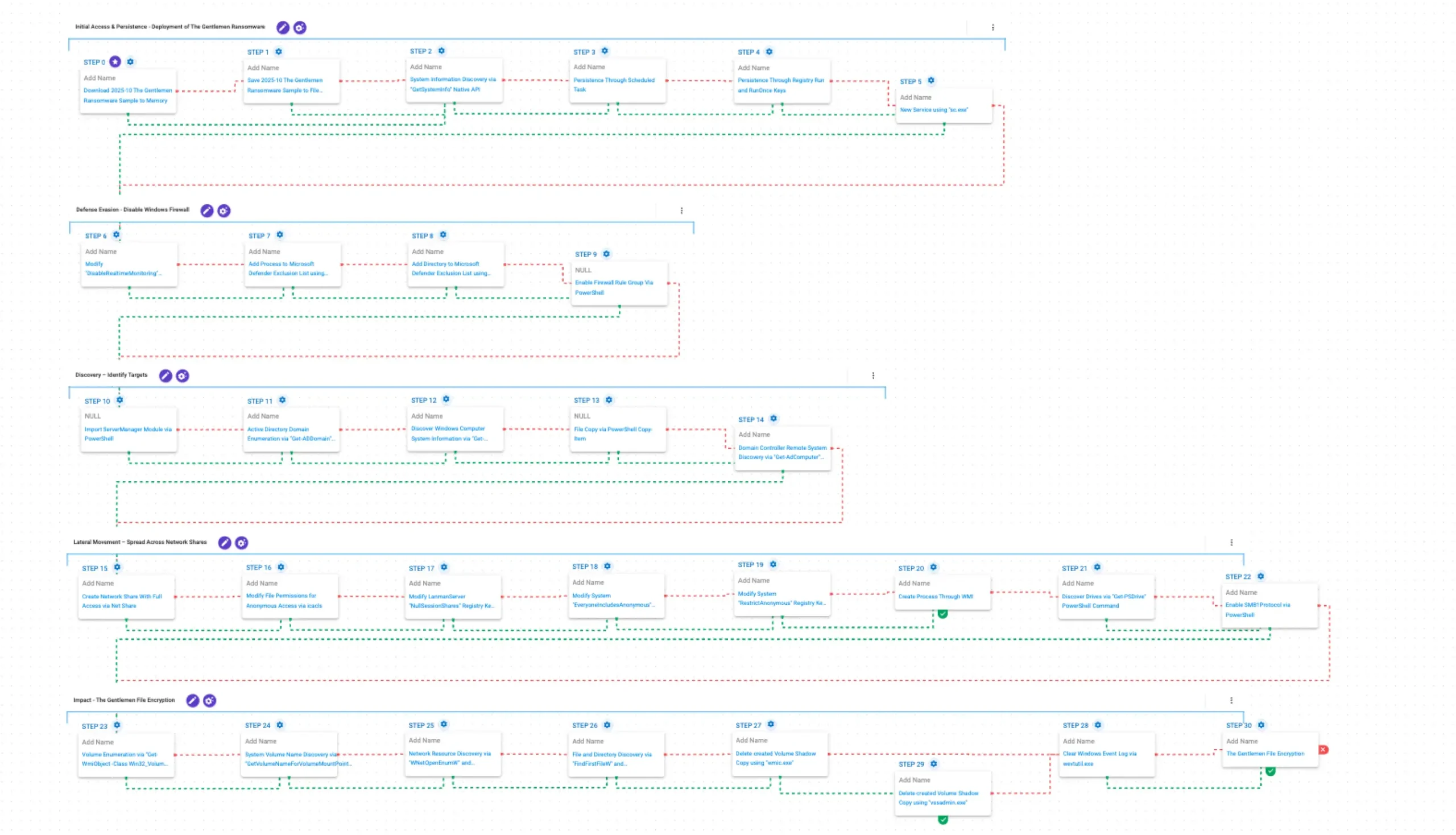
This emulation replicates the sequence of behaviors associated with the deployment of The Gentlemen ransomware on a compromised system with the intent of providing customers with the opportunity to detect and/or prevent a compromise in progress.
The emulation is based on the behaviors reported by TrendMicro, CyberReason, BlackPointCyber and Checkpoint.
Initial Access & Persistence – Deployment of The Gentlemen Ransomware
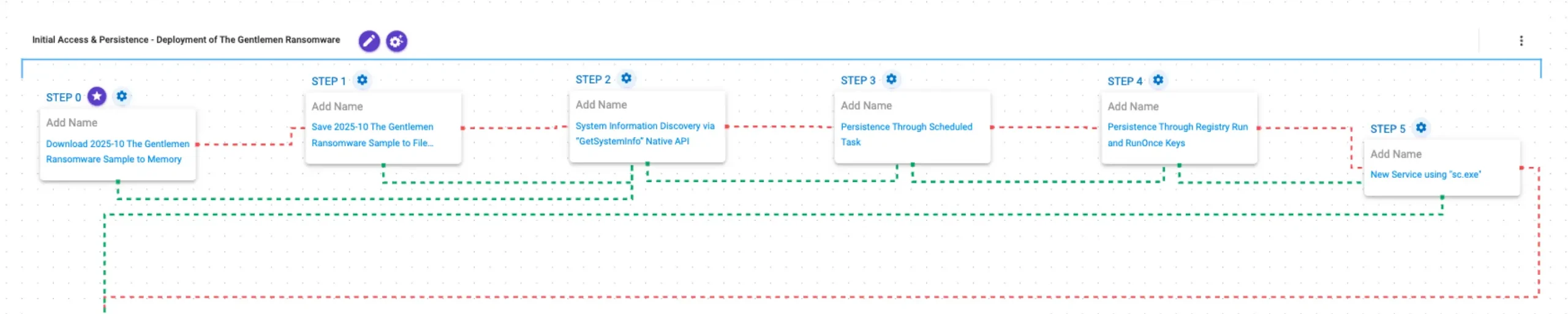
This stage begins with the deployment of The Gentlemen ransomware. It gathers basic system information using GetSystemInfo, then establishes persistence through multiple mechanisms. A Scheduled Task is created to execute at system startup, a Registry Run key is added for user-level persistence, and a new service is created.
2025-10 The Gentlemen Ransomware Sample (T1105): The Gentlemen Ransomware Sample (SHA256: 3ab9575225e00a83a4ac2b534da5a710bdcf6eb72884944c437b5fbe5c5c9235) is first downloaded to memory and then saved to disk in two separate scenarios to test network and endpoint controls and their ability to prevent the delivery of known malicious samples.
System Information Discovery via “GetSystemInfo” Native API (T1082): This scenario executes the GetSystemInfo Windows API call to retrieve system information. This can be used to detect sandboxes, create unique identifiers, and adjust execution behaviors.
Persistence Through Scheduled Task (T1053.005): This scenario creates a new scheduled task for persistence using the schtasks utility.
Persistence Through Registry Run and RunOnce Keys (T1547.001): This scenario creates an entry under the HKLM\Software\Microsoft\Windows\CurrentVersion\Run registry key to be run at system startup and acquire persistence.
New! Service using “sc.exe” (T1543.003): This scenario leverages the native sc command line tool to create a new service and performs a query in order to verify if the service was correctly created.
Defense Evasion – Disable Windows Firewall
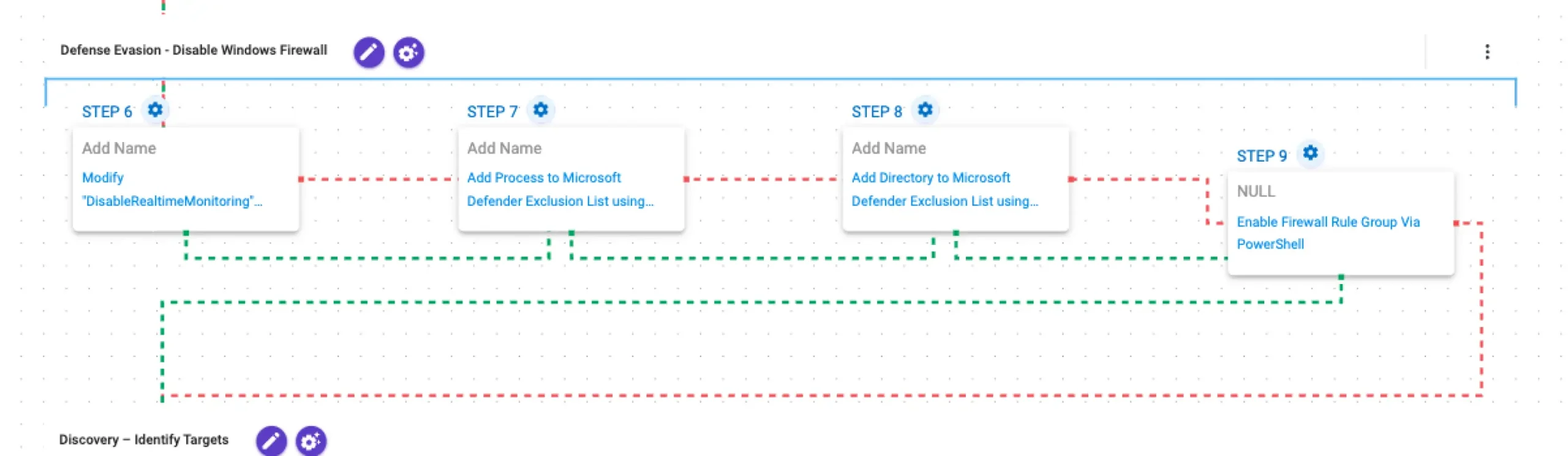
In this stage, the malware disables and weakens security controls to operate without interference. It turns off Microsoft Defender real-time monitoring using Set-MpPreference and adds exclusions for both specific processes and the entire C:\ drive via Add-MpPreference. Finally, it enables Network Discovery firewall rules through Get-NetFirewallRule and Enable-NetFirewallRule, allowing increased visibility and communication across the network.
Modify “DisableRealtimeMonitoring” Windows Defender Preference (T1562.001): This scenario executes the Set-MpPreference PowerShell cmdlet to modify the DisableRealtimeMonitoring Windows Defender preference, effectively deactivating real-time protection.
Add Process to Microsoft Defender Exclusion List using PowerShell (T1562.001): This scenario adds a process to the Microsoft Defender exclusion list using the Add-MpPreference PowerShell cmdlet.
Add Directory to Microsoft Defender Exclusion List using PowerShell (T1562.001): This scenario uses the Add-MpPreference cmdlet to add the %TEMP%\aiq-temp-exclusion\ directory path to the Windows Defender exclusion list.
New! Enable Firewall Rule Group Via PowerShell (T1686): This scenario emulates the toggling of firewall rule groups on Windows via the Enable-NetFirewallRule PowerShell cmdlet.
Discovery – Identify Targets
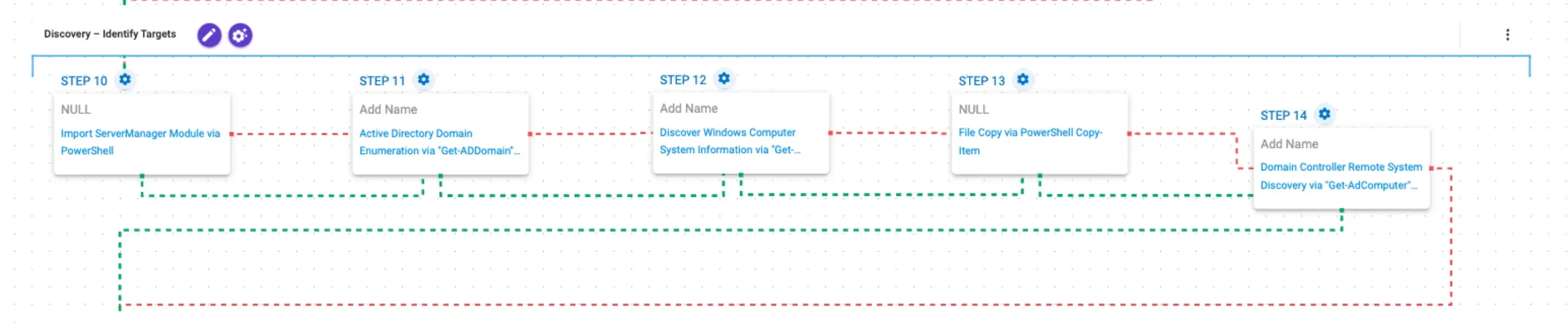
In this stage, the malware performs domain and system discovery to identify potential targets. It imports the ServerManager module and queries domain information using Get-ADDomain, followed by gathering system details via Get-WmiObject Win32_ComputerSystem. It then enumerates domain-joined computers using Get-ADComputer to build a list of potential lateral movement targets. Finally, it prepares for propagation by copying its payload to a specified location using Copy-Item.
New! Import ServerManager Module via PowerShell (T1059.001): This scenario imports the ServerManager module via PowerShell. Adversaries may load administrative modules to interact with server roles, features, and configurations as part of post-compromise activities.
New! Active Directory Domain Enumeration via “Get-ADDomain” PowerShell Command (T1482): This scenario emulates querying Active Directory domain information using PowerShell. Adversaries may retrieve domain configuration details to better understand the environment and plan further actions.
Discover Windows Computer System Information via “Get-WMIObject Win32_ComputerSystem” PowerShell Command (T1082): This scenario executes the PowerShell cmdlet Get-WMIObject Win32_ComputerSystem to retrieve Windows computer system information.
New! File Copy via PowerShell Copy-Item (T1105): This scenario executes the PowerShell Copy-Item cmdlet to copy a file to a target destination.
Domain Controller Remote System Discovery via “Get-AdComputer” PowerShell Command (T1018): This scenario executes the Get-AdComputer PowerShell cmdlet to gather information about other systems that can be used for lateral movement.
Lateral Movement – Spread Across Network Shares

In this stage, the malware enables lateral movement by preparing a remote-accessible share and weakening authentication controls. It first creates a network share with full access for all users, then adjusts permissions using icacls to grant access to anonymous users. It modifies Registry settings to allow null session access by configuring NullSessionShares, enabling anonymous access with EveryoneIncludesAnonymous, and disabling restrictions via RestrictAnonymous. With these configurations in place, the malware executes its payload on a remote system using WMIC to create a process on the target host. It then enumerates available filesystem drives using Get-PSDrive and enables the SMBv1 protocol via Enable-WindowsOptionalFeature to support legacy network communication, facilitating further propagation.
New! Create Network Share With Full Access via Net Share (T1021): This scenario executes net share to create a Windows hidden net share with full access permissions.
New! Modify File Permissions for Anonymous Access via icacls (T1222.001): This scenario executes the icacls.exe utility to grant explicit Full (F) rights on a generated temporary file, a technique used to evade access control lists and access protected files.
New! Modify LanmanServer “NullSessionShares” Registry Key via “reg.exe” ( T1135 ): This scenario modifies the registry value NullSessionShares under the key HKEY_LOCAL_MACHINE\SYSTEM\CurrentControlSet\Services\LanmanServer\Parameters to share$, enabling anonymous access to that specified share.
New! Modify System “EveryoneIncludesAnonymous” Registry Key via “reg.exe” (T1556.009): This scenario modifies the registry value EveryoneIncludesAnonymous under the key HKEY_LOCAL_MACHINE\SYSTEM\CurrentControlSet\Control\Lsa to 1, to enable anonymous logons to the Everyone group.
New! Modify System “RestrictAnonymous” Registry Key via “reg.exe” (T1556.009): This scenario modifies the registry value RestrictAnonymous under the key HKEY_LOCAL_MACHINE\SYSTEM\CurrentControlSet\Control\Lsa to 0, to reduce restrictions on anonymous logons.
Create Process Through WMI (T1047): This scenario executes a binary by creating a process using Windows Management Instrumentation (WMI).
New! Discover Drives via “Get-PSDrive” PowerShell Command (T1120): This scenario executes the PowerShell cmdlet Get-PsDrive to list all the data drives from the host.
New! Enable SMB1Protocol via PowerShell (T1685): This scenario executes the PowerShell cmdlet Enable-WindowsOptionalFeature to enable support for the deprecated SMBv1 protocol.
Impact – The Gentlemen File Encryption

In this stage, The Gentlemen performs volume discovery using Win32_Volume to identify available storage locations, followed by volume name resolution via GetVolumeNameForVolumeMountPointA and network resource enumeration using WNetOpenEnum and WNetEnumResourceW. It then conducts file and directory enumeration through the FindFirstFileW and FindNextFileW APIs to locate target files. To inhibit recovery, it deletes Volume Shadow Copies using both wmic.exe and vssadmin.exe and clears Windows Event Logs using wevtutil.exe to remove traces. Finally, the malware encrypts files using XChaCha20 for data encryption and Curve25519 for key protection.
New! Volume Enumeration via “Get-WmiObject -Class Win32_Volume” PowerShell Command (T1082): This scenario executes the Get-WmiObject -Class Win32_Volume PowerShell cmdlet to retrieve detailed information about all volumes present on the local system.
System Volume Name Discovery via “GetVolumeNameForVolumeMountPointA” Native API (T1082): This scenario calls the GetVolumeNameForVolumeMountPointA Windows API function for each drive letter to retrieve the volume GUID path.
Network Resource Discovery via “WNetOpenEnumW” and “WNetEnumResourceW” Native API (T1049): This scenario performs network resource discovery by calling the WNetOpenEnumW and WNetEnumResourceW Windows API calls to enumerate network resources from the local computer.
File and Directory Discovery via “FindFirstFileW” and “FindNextFileW” Native API (T1083): This scenario executes the FindFirstFileW and FindNextFileW Windows API calls to enumerate the file system.
Delete created Volume Shadow Copy using “wmic.exe” (T1490): This scenario executes the wmic shadowcopy delete command to delete a Volume Shadow Copy created by the emulation.
Delete created Volume Shadow Copy using “vssadmin.exe” (T1490): This scenario executes the vssadmin.exe utility to delete a recent Volume Shadow Copy created by the assessment template.
Clear Windows Event Log via wevtutil.exe (T1070.001): The scenario uses the wevtutil.exe binary to clear event logs from the system.
New! The Gentlemen File Encryption (T1486): This scenario performs the file encryption routines used by common ransomware families. Files matching an extension list are identified and encrypted in place using similar encryption algorithms as used by The Gentlemen ransomware.
The Gentlemen Ransomware – 2025-10 – Associated Tactics, Techniques and Procedures (TTPs)
This emulation consists of all post-compromise Tactics, Techniques, and Procedures (TTP) exhibited by The Gentlemen during its most recent activities.
The emulation is based on the behaviors reported by TrendMicro, CyberReason, BlackPointCyber and Checkpoint.
Malware Samples
Consists of the malware samples used by the adversary during this campaign.
2025-10 The Gentlemen Ransomware Sample (T1105): The Gentlemen Ransomware Sample (SHA256: 3ab9575225e00a83a4ac2b534da5a710bdcf6eb72884944c437b5fbe5c5c9235) is downloaded to memory and saved to disk in two separate scenarios to test network and endpoint controls and their ability to prevent the delivery of known malicious samples.
2022-02 PowerRun Sample (T1105): The PowerRun Sample (SHA256: 4c82fbafef9bab484a2fbe23e4ec8aac06e8e296d6c9e496f4a589f97fd4ab71) is downloaded to memory and saved to disk in two separate scenarios to test network and endpoint controls and their ability to prevent the delivery of known malicious samples.
2024-12 KILLAV all.exe Sample (T1105): The Killav all.exe Sample (SHA256: 7a311b584497e8133cd85950fec6132904dd5b02388a9feed3f5e057fb891d09) is downloaded to memory and saved to disk in two separate scenarios to test network and endpoint controls and their ability to prevent the delivery of known malicious samples.
Persistence
Consists of techniques that adversaries use to keep access to systems across restarts, changed credentials, and other interruptions that could cut off their access.
Persistence Through Scheduled Task (T1053.005): This scenario creates a new scheduled task for persistence using the schtasks utility.
Persistence Through Registry Run and RunOnce Keys (T1547.001): This scenario creates an entry under the HKLM\Software\Microsoft\Windows\CurrentVersion\Run registry key to be run at system startup and acquire persistence.
New! Service using “sc.exe” (T1543.003): This scenario leverages the native sc command line tool to create a new service and performs a query in order to verify if the service was correctly created.
Execution
Consists of techniques that result in adversary-controlled code running on a local or remote system. Techniques that run malicious code are often paired with techniques from all other tactics to achieve broader goals, such as exploring a network or stealing data.
Import ServerManager Module via PowerShell (T1059.001): This scenario imports the ServerManager module via PowerShell. Adversaries may load administrative modules to interact with server roles, features, and configurations as part of post-compromise activities.
Defense Evasion
Consists of techniques that adversaries use to avoid detection throughout their compromise. Techniques used for defense evasion include uninstalling/disabling security software or obfuscating/encrypting data and scripts.
Allow Unrestricted Outbound NTLM Authentication via Registry (T1112): This scenario uses reg.exe to set the RestrictSendingNTLMTraffic registry value, located at HKLM\SYSTEM\CurrentControlSet\Control\Lsa\MSV1_0, to 0. This allows for unrestricted NTLM requests to other potential victim machines.
Enable Restricted Admin Mode via Registry (T1112): This scenario enables the Restricted Admin setting by creating the DisableRestrictedAdmin registry key and setting the value to 0.
Configure Negotiate (1) Security Layer Authentication for Remote Desktop Connections (SYSTEM) (T1112): This scenario sets the value of the SecurityLayer registry, located at HKEY_LOCAL_MACHINE\SYSTEM\CurrentControlSet\Control\Terminal Server\WinStations\RDP-Tcp, to 1 to force the server to use the negotiate Security Layer, allowing the use of either TLS/SSL or the native RDP Security Layer depending on client capabilities.
Modify “DisableRealtimeMonitoring” Windows Defender Preference (T1562.001): This scenario executes the Set-MpPreference PowerShell cmdlet to modify the DisableRealtimeMonitoring Windows Defender preference, effectively deactivating real-time protection.
Add Process to Microsoft Defender Exclusion List using PowerShell (T1562.001): This scenario adds a process to the Microsoft Defender exclusion list using the Add-MpPreference PowerShell cmdlet.
Add Directory to Microsoft Defender Exclusion List using PowerShell (T1562.001): This scenario uses the Add-MpPreference cmdlet to add the %TEMP%\aiq-temp-exclusion\ directory path to the Windows Defender exclusion list.
Clear Windows Event Log via wevtutil.exe (T1070.001): The scenario uses the wevtutil.exe binary to clear event logs from the system.
Enable Remote Desktop Connections via Registry (SYSTEM) (T1562.001): The registry key HKLM\SYSTEM\CurrentControlSet\Control\Terminal Services\fDenyTSConnections is set to 0 which will enable remote access to the system using Remote Desktop.
Enable Firewall Rule Group Via Netsh (T1686): This scenario enables a firewall rule group using netsh.
Modify File Permissions for Anonymous Access via icacls (T1222.001): This scenario executes the icacls.exe utility to grant explicit Full (F) rights on a generated temporary file, a technique used to evade access control lists and access protected files.
Modify LanmanServer “NullSessionShares” Registry Key via “reg.exe” (T1135): This scenario modifies the registry value NullSessionShares under the key HKEY_LOCAL_MACHINE\SYSTEM\CurrentControlSet\Services\LanmanServer\Parameters to share$, enabling anonymous access to that specified share.
Modify System “EveryoneIncludesAnonymous” Registry Key via “reg.exe” (T1556.009): This scenario modifies the registry value EveryoneIncludesAnonymous under the key HKEY_LOCAL_MACHINE\SYSTEM\CurrentControlSet\Control\Lsa to 1, to enable annonymous logons to the Everyone group.
Modify System “RestrictAnonymous” Registry Key via “reg.exe” (T1556.009): This scenario modifies the registry value RestrictAnonymous under the key HKEY_LOCAL_MACHINE\SYSTEM\CurrentControlSet\Control\Lsa to 0, to reduce restrictions on anonymous logons.
Enable SMB1Protocol via PowerShell (T1685): This scenario executes the PowerShell cmdlet Enable-WindowsOptionalFeature to enable support for the deprecated SMBv1 protocol.
Enable Firewall Rule Group Via PowerShell (T1686): This scenario emulates the toggling of firewall rule groups on Windows via the Enable-NetFirewallRule PowerShell cmdlet.
Discovery
Consists of techniques that adversaries use to discover information related to the compromised environment.
System Information Discovery via “GetSystemInfo” Native API (T1082): This scenario executes the GetSystemInfo Windows API call to retrieve system information. This can be used to detect sandboxes, create unique identifiers, and adjust execution behaviors.
File and Directory Discovery via “FindFirstFileW” and “FindNextFileW” Native API (T1083): This scenario executes the FindFirstFileW and FindNextFileW Windows API calls to enumerate the file system.
Account Discovery using “net.exe” command (T1087.001): This scenario executes the native net user Windows command to enumerate available accounts on the system.
Domain Administrator Accounts Discovery Via Net Command Script (T1087.002): This scenario executes net group command to list domain administrator accounts.
Local Administrator Accounts Discovery via “net localgroup” Command (T1069): This scenario will enumerate a local permission group using the net localgroup administrators command.
Collect Information about Remote Desktop Session using “query session” Command (T1082): This scenario executes the query session command to gather information about sessions on a Remote Desktop Session Host server.
Obtain System Information via “systeminfo” Command (T1082): This scenario executes the systeminfo command to collect information about the compromised system.
Obtain Username using “whoami” Command (T1033): This scenario executes the native whoami command to receive details of the running user account.
Recursive User Directory Enumeration via dir (T1083): This scenario executes the dir command to recursively list all files and folders under C:\Users.
Volume Enumeration via “Get-WmiObject -Class Win32_Volume” PowerShell Command (T1082): This scenario executes the Get-WmiObject -Class Win32_Volume PowerShell cmdlet to retrieve detailed information about all volumes present on the local system.
System Volume Name Discovery via “GetVolumeNameForVolumeMountPointA” Native API (T1082): This scenario calls the GetVolumeNameForVolumeMountPointA Windows API function for each drive letter to retrieve the volume GUID path.
Process Discovery Through Tasklist (T1057): This scenario enumerates processes running on the target asset through the tasklist Windows utility. The results are saved to a file in a temporary location.
Discover Drives via “Get-PSDrive” PowerShell Command (T1120): This scenario executes the PowerShell cmdlet Get-PsDrive to list all the data drives from the host.
Network Resource Discovery via “WNetOpenEnumW” and “WNetEnumResourceW” Native API (T1049): This scenario performs network resource discovery by calling the WNetOpenEnumW and WNetEnumResourceW Windows API calls to enumerate network resources from the local computer.
Active Directory Domain Enumeration via “Get-ADDomain” PowerShell Command (T1482): This scenario emulates querying Active Directory domain information using PowerShell. Adversaries may retrieve domain configuration details to better understand the environment and plan further actions.
Discover Windows Computer System Information via “Get-WMIObject Win32_ComputerSystem” PowerShell Command (T1082): This scenario executes the PowerShell cmdlet Get-WMIObject Win32_ComputerSystem to retrieve Windows computer system information.
Domain Controller Remote System Discovery via “Get-AdComputer” PowerShell Command (T1018): This scenario executes the Get-AdComputer PowerShell cmdlet to gather information about other systems that can be used for lateral movement.
Lateral Movement
Consists of techniques that adversaries use to enter and control remote systems on a network. Following through on their primary objective often requires exploring the network to find their target and subsequently gaining access to it. Reaching their objective often involves pivoting through multiple systems and accounts to gain.
Create Network Share With Full Access via Net Share (T1021): This scenario executes net share to create a Windows hidden network share with full access permissions.
Create Process Through WMI (T1047): This scenario executes a binary through Windows Management Instrumentation (WMI) queries.
File Copy via PowerShell Copy-Item (T1105): This scenario executes the PowerShell Copy-Item cmdlet to copy a file to a target destination.
Impact
Consists of techniques that adversaries use to disrupt availability or compromise integrity by manipulating business and operational processes.
Delete created Volume Shadow Copy using “wmic.exe” (T1490): This scenario executes the wmic shadowcopy delete command to delete a Volume Shadow Copy created by the emulation.
Delete created Volume Shadow Copy using “vssadmin.exe” (T1490): This scenario executes the vssadmin.exe utility to delete a recent Volume Shadow Copy created by the assessment template.
The Gentlemen File Encryption (T1486): This scenario performs the file encryption routines used by common ransomware families. Files matching an extension list are identified and encrypted in place using similar encryption algorithms as used by The Gentlemen ransomware.
Wrap-up
In summary, these emulations will evaluate security and incident response processes and support the improvement of your security control posture against the behaviors exhibited by the Gentlemen ransomware. With data generated from continuous testing and use of these assessment templates, you can focus your teams on achieving key security outcomes, adjust your security controls, and work to elevate your total security program effectiveness against a known and dangerous threat.
AttackIQ is the industry’s leading Continuous Threat Exposure Management (CTEM) platform, enabling organizations to measure true exposure, prioritize risk, and disrupt real-world attack paths. By moving beyond static vulnerability data, AttackIQ operationalizes CTEM by continuously validating exposures against real adversary behavior and defensive controls. The platform connects vulnerabilities, configurations, identities, and detections into adversary-validated attack paths—quantifying the likelihood of attacker movement and impact. This evidence-based approach empowers security leaders to focus on what matters most, optimize defensive investments, and strengthen resilience through threat-informed, AI-driven security operations.