Key Takeaways
- Everest is a double-extortion ransomware operation whose analyzed encryptor is a ConfuserEx-protected .NET 4.0 binary tailored to the targeted victim.
- The encryptor pairs AES-128-CBC file encryption with an RSA-1024-wrapped key seed, although the code declares both primitives at double their real size (RSA-4096 and AES-256) before silently downgrading them at runtime.
- Everest performs an unusually noisy pre-encryption sequence, including recovery sabotage, Controlled Folder Access (CFA) disablement, SMBv1 re-enablement, firewall rule modifications, token policy relaxation, and granting the Everyone group full control over fixed drives, providing defenders with a meaningful opportunity to detect and respond before encryption begins.
- Distinctive behaviors include Wake-on-LAN broadcasts to wake dormant hosts prior to lateral movement, DACL-based process self-protection that hinders standard termination methods, and a dedicated anti-Raccine routine that removes the tool’s IFEO hooks and persistence mechanisms before recovery sabotage begins.
- Everest runs three continuous background monitoring loops that terminate reverse-engineering and network-analysis tools, disable security, backup, and database services, and kill memory-intensive processes.
- The ransom note claims that approximately 1 TB of data was stolen, but no exfiltration functionality was identified in the analyzed binary, suggesting that data theft, if it occurred, took place during an earlier stage of the intrusion.
AttackIQ has created and released a new assessment that emulates the Tactics, Techniques, and Procedures (TTPs) associated with the deployment of Everest ransomware to help customers validate their security controls and their ability to defend against this threat.
Validating your security program performance against these behaviors is vital in reducing risk. By using this new emulation in the AttackIQ Adversarial Exposure Validation (AEV) Platform, security teams will be able to:
- Evaluate security control performance against baseline behaviors associated with Everest ransomware.
- Assess their security posture against an opportunistic adversary, which does not discriminate when it comes to selecting its targets.
- Continuously validate detection and prevention pipelines against a playbook similar to those used by groups currently focused on ransomware activities.
Threat Overview
Everest is a long-running double-extortion ransomware operation active since at least December 2020. The group targets a broad range of sectors, including government, healthcare, manufacturing, and IT services, with confirmed victims across North America, Europe, and Asia. Reported initial access vectors include the exploitation of vulnerable public-facing applications, phishing campaigns, and the theft of credentials used to access remote services. Like many modern ransomware groups, Everest combines data encryption with extortion, threatening to publish allegedly stolen information on its Tor-based leak site.
The analyzed sample clearly identifies itself as Everest through multiple embedded artifacts, including the .everest encrypted-file extension, the EVERESTRANSOMWARE.txt ransom note, a salutation beginning with “Greetings from the Everest team,” the contact address [email protected], and the group’s onion-based blog URL.
The ransomware also implements a geo-fence that terminates execution on systems configured with Commonwealth of Independent States (CIS) culture or locale identifiers. This behavior is commonly observed among Russian-speaking ransomware operations and is generally intended to avoid impacting organizations located within CIS countries.
Beyond its encryption capabilities, Everest incorporates several operational features designed to maximize impact and hinder recovery, including recovery sabotage, security-control weakening, broad permission changes, process self-protection, and continuous monitoring loops that disable services and terminate competing processes. Together, these behaviors reflect a mature ransomware operation focused on ensuring successful encryption while complicating detection, response, and recovery efforts.
This analysis is based on the technical report published by RansomLook and AttackIQ’s independent analysis of the same binary.
Sample Profile
Artifact: Everest encryptor (hlntqyun.exe)
Hash (SHA-256): 1df92bf4c967297d8a39fc3f619a56702ee96d5cf9196b8e1d5b3654746c6514
Type: PE32 .NET 4.0 (managed, i386)
The analyzed sample is a 114 KB C# assembly targeting .NET Framework 4.0, with the original filename hlntqyun.exe and a .NET compile timestamp from July 2022 that coincides with the date the targeted victim appeared on Everest’s leak site.
The binary is protected with ConfuserEx and employs anti-tamper protection alongside control-flow obfuscation, string encryption, symbol renaming, and integer and boolean constant obfuscation, significantly increasing the effort required for static analysis and reverse engineering.
Analysis also suggests that the ransomware was built specifically for the targeted victim: the ransom note contains a hardcoded salutation referencing the organization, and the embedded RSA public key appears unique to the sample. As a result, file hashes and certain embedded artifacts are expected to vary across deployments.
Inside the Binary: Packing, Obfuscation, and Evasion
Three characteristics are immediately apparent during analysis and significantly shape the reverse-engineering process: extensive obfuscation, dynamic API resolution, and cryptographic declarations that do not reflect the algorithms ultimately used at runtime.
ConfuserEx Protection and String Obfuscation
The sample is a .NET Framework 4.0 executable protected with ConfuserEx, employing anti-tamper protection, symbol renaming, constant obfuscation, and compression while removing the tool’s identifying watermark. Strings are stored in encrypted form and resolved at runtime through approximately 210 dedicated methods that invoke a GZip- and Base64-based decryption routine. As a result, static analysis provides limited visibility into the malware’s functionality until the sample is unpacked and deobfuscated.
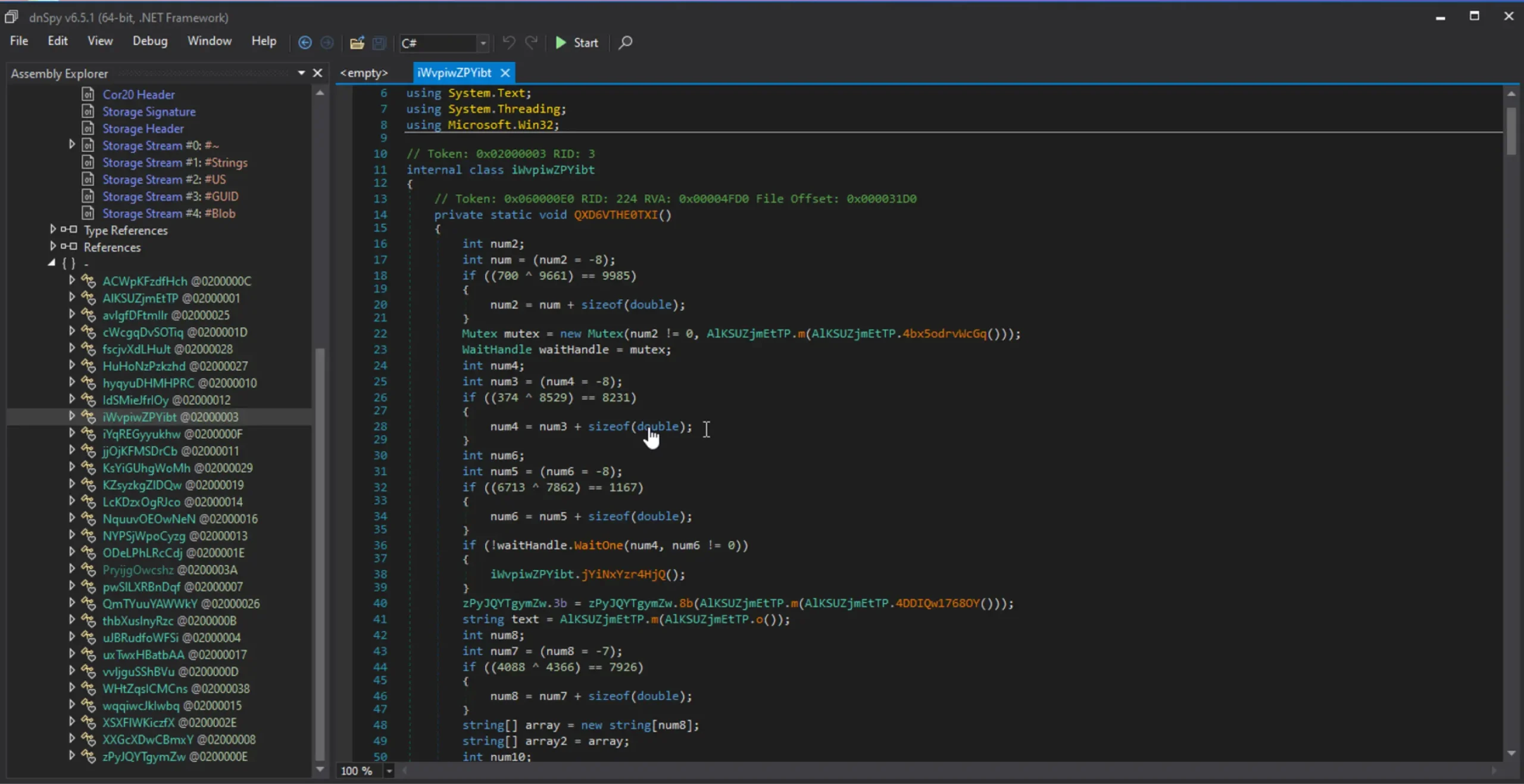
Figure 1. ConfuserEx-protected Everest binary.
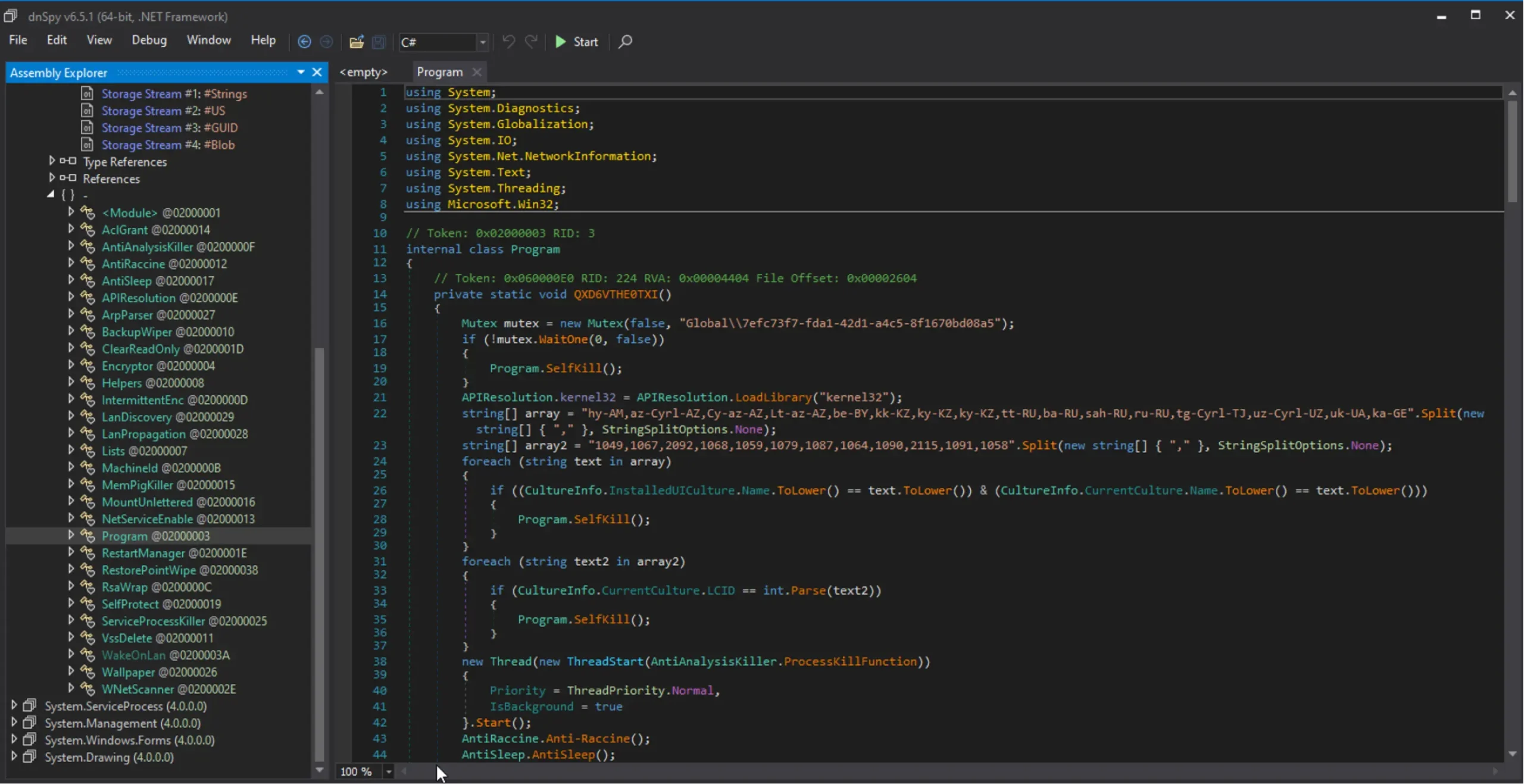
Figure 2. Everest binary after ConfuserEx deobfuscation
Dynamic API Resolution
Win32 APIs are resolved dynamically at runtime rather than being exposed through the import table. The only statically imported functions are LoadLibrary, GetProcAddress, and SystemParametersInfo. All other Windows API calls are obtained through runtime resolution across libraries, including rstrtmgr.dll, advapi32.dll, netapi32.dll, mpr.dll, and srclient.dll. This approach minimizes the binary’s static footprint and obscures its capabilities, complicating static analysis and reducing the effectiveness of import-based detection techniques.
Misleading Cryptographic Declarations
The malware’s cryptographic configuration is intentionally misleading, declaring stronger algorithms than those ultimately used. An RSACryptoServiceProvider instance is initialized with a requested key size of 4096 bits, but a subsequent FromXmlString call loads a 128-byte modulus, resulting in an effective RSA-1024 key. Similarly, the AES provider declares a 256-bit key size, but the assignment of a 16-byte key reduces the effective strength to AES-128. The runtime implementation therefore relies on RSA-1024 and AES-128 despite stronger values appearing in the code. This will be discussed in more detail in the Encryption section.
Execution Walkthrough
This section traces the ransomware’s behavior from launch to self-deletion. Although execution is largely linear, three background threads operate concurrently throughout the attack lifecycle killing processes and services. The phases below reflect the observed execution order, with representative commands shown at the time of execution, and the complete command set consolidated in the Appendix section.
Mutex and Geo-Fencing Checks
Execution begins with the creation of a single-instance mutex Global\7efc73f7-fda1-42d1-a4c5-8f1670bd08a5; if the mutex already exists, the process terminates. The ransomware then applies a geo-fence by comparing the system’s UI culture and locale identifier against a hardcoded list of Commonwealth of Independent States (CIS) values, including culture names such as ru-RU, uk-UA, kk-KZ, and be-BY, and locale identifiers (LCIDs) such as 1049, 1067, 2092, and 1068. The checks are performed through the .NET properties CultureInfo.InstalledUICulture.Name and CultureInfo.CurrentCulture.LCID. If a match is identified, execution exits silently without performing any additional actions. This behavior is commonly observed among Russian-speaking ransomware operations and is generally intended to avoid impacting systems within CIS countries.
Background Monitoring Threads
After completing its startup checks, Everest launches three background threads that remain active for the lifetime of the process. Together, they terminate analysis tools, disable security and recovery mechanisms, and kill processes that could interfere with encryption.
Reverse-engineering Tool Killer (Every 4 seconds)
This thread monitors running processes and compares both process names and main window titles against a hardcoded list of analysis tools, including debuggers and disassemblers, unpackers and dumpers, packer-identification tools, and network-analysis utilities. Matching processes are terminated through the Windows Restart Manager using the sequence RmStartSession → RmRegisterResources → RmShutdown → RmEndSession. Unlike direct process termination, the Restart Manager can more reliably shut down applications holding active file handles. The full list of targeted processes is provided in the Appendix.
Security Control, Recovery, and File-Lock Suppression (Every 15 seconds)
This thread continuously weakens defensive controls and removes obstacles to encryption by disabling services, stopping security products, and terminating applications that may hold file locks. At startup, it invokes sc.exe to disable the SQLTELEMETRY, SQLTELEMETRY$ECWDB2, SQLWriter, SstpSvc, and MBAMService services, preventing them from automatically restarting after termination.
The thread then enumerates installed services through the .NET ServiceController.GetServices() API and applies several targeting rules. Any service whose name begins with “sophos” is stopped through ServiceController.Stop(), as are services whose names contain the strings backup or sql. In addition, Everest walks a large hardcoded list of service names, stopping matching services through the same mechanism.
The thread also terminates processes from a separate hardcoded list using the Windows Restart Manager. By stopping services and terminating user applications that may hold open file handles, the malware increases the number of files available for encryption while simultaneously degrading recovery and security capabilities.
Targeted service and process categories include:
- Security and endpoint protection products (McAfee, Symantec, Kaspersky, Malwarebytes, ESET, Trend Micro, Sophos, and others)
- Backup and recovery solutions (Veeam, Acronis, Symantec System Recovery, Zoolz, and others)
- Microsoft Exchange components, mail services and email clients
- Microsoft Office applications (winword, excel, powerpnt, visio, onenote, msaccess)
- Database engines and supporting components (mysqld, sqlservr, oracle, and others)
- IIS and web application services
The full list of targeted services and processes is provided in the Appendix.
Memory-Intensive Process Killer (Every 2.5 seconds)
This thread terminates processes whose private memory usage exceeds 250 MB unless they appear on a small allowlist that includes web browsers, explorer.exe, winlogon.exe, Windows Search components, and powershell.exe. The logic provides a simple but yet effective mechanism for interrupting memory-intensive sandboxes, debuggers, and forensic tooling that may be monitoring the ransomware’s activity.
Raccine Neutralization Routine
Everest contains dedicated logic to remove Raccine, an open-source anti-ransomware utility designed to intercept common recovery-sabotage commands through Image File Execution Options (IFEO) debugger registrations. By placing debugger entries on tools frequently abused by ransomware, such as vssadmin.exe and wbadmin.exe, Raccine can block or alert on attempts to delete backups and shadow copies.
To neutralize these protections, Everest removes the IFEO registry entries associated with the following executables: vssadmin.exe, wbadmin.exe, bcdedit.exe, powershell.exe, diskshadow.exe, net.exe, taskkill.exe, wmic.exe
The malware also removes additional Raccine artifacts, including the Raccine Tray autorun entry, the main Raccine registry key, and the application’s Event Log registration under:
HKLM\SOFTWARE\Microsoft\Windows\CurrentVersion\Run\Raccine Tray
HKLM\SOFTWARE\Raccine
HKLM\SYSTEM\CurrentControlSet\Services\EventLog\Application\Raccine
Finally, Everest terminates active Raccine processes and deletes the tool’s scheduled update task:
taskkill /F /IM Raccine.exe
taskkill /F /IM RaccineSettings.exe
schtasks /DELETE /TN "Raccine Rules Updater" /F
The presence of a dedicated Raccine-removal routine demonstrates that the operators anticipated this specific defensive control and deliberately eliminated it before proceeding with recovery-sabotage activities later in the execution chain.
DACL-Based Self-Protection
Before proceeding with recovery sabotage, Everest implements safeguards designed to ensure uninterrupted execution and resist termination attempts.
First, it invokes SetThreadExecutionState to prevent the system from entering sleep or hibernation states during lateral movement and encryption operations, ensuring that long-running tasks can complete without interruption.
Everest then implements a DACL-based self-protection mechanism designed to hinder process termination. The ransomware modifies its own process security descriptor through SetKernelObjectSecurity, inserting an ACCESS_DENIED_ACE for the World SID (S-1-1-0) into the process DACL. As a result, attempts to obtain termination rights against the process may fail, causing common tools such as taskkill and Task Manager to return Access Denied errors, even as SYSTEM. By modifying its own security descriptor, Everest increases the effort required to interrupt execution, as responders must first bypass or modify the process DACL before a termination handle can be obtained.
Recovery Sabotage
With Raccine neutralized, Everest proceeds to eliminate recovery mechanisms before beginning encryption. It first iterates through drives C: to H: deleting files that match a hardcoded set of backup-related extensions:
del /s /f /q c:\.VHD c:\.bac c:\.bak c:\.wbcat c:\.bkf c:\Backup.* c:\backup. c:\.set c:\.win c:\*.dsk
Then, it deletes all Volume Shadow Copies through WMI-based deletion routines. If it detects that it is running on Windows XP, it falls back to vssadmin.exe instead. As an additional safeguard, it resizes Shadow Copy storage on each fixed drive to 401 MB before restoring it to an unbounded size. This technique forces existing shadow copies to be purged even if direct deletion attempts fail.
powershell.exe Get-CimInstance Win32_ShadowCopy | Remove-CimInstance
vssadmin resize shadowstorage /for=c: /on=c: /maxsize=401MB
vssadmin resize shadowstorage /for=c: /on=c: /maxsize=unbounded
vssadmin Delete Shadows /all /quiet        :: legacy / XP path
The malware also removes all System Restore points through SRRemoveRestorePoint API, and empties the Recycle Bin. Together, these actions are designed to reduce the victim’s ability to recover data without paying the ransom and to maximize the impact of the subsequent encryption phase.
cmd.exe /c rd /s /q %SYSTEMDRIVE%\$Recycle.bin
Environment Preparation
Everest then prepares the host for subsequent propagation and encryption activities. The ransomware conditionally disables Windows Defender Controlled Folder Access, first querying Win32_OperatingSystem and verifying that the reported OS version contains “10” before executing Set-MpPreference -EnableControlledFolderAccess Disabled. It also re-enables the legacy SMB1 protocol, enables the Network Discovery and File and Printer Sharing firewall rule groups, and modifies several registry settings that broaden remote-access capabilities and filesystem compatibility.
powershell.exe Set-MpPreference -EnableControlledFolderAccess Disabled
powershell.exe Enable-WindowsOptionalFeature -Online -FeatureName SMB1Protocol
netsh advfirewall firewall set rule group="Network Discovery" new enable=Yes
netsh advfirewall firewall set rule group="File and Printer Sharing" new enable=Yes
Specifically, the malware sets LocalAccountTokenFilterPolicy and EnableLinkedConnections under HKLM\SOFTWARE\Microsoft\Windows\CurrentVersion\Policies\System, and enables long-path support through the LongPathsEnabled value under HKLM\SYSTEM\CurrentControlSet\Control\FileSystem. It also grants the Everyone group full control over files and directories on fixed drives using icacls.
reg ADD "HKLM\SOFTWARE\Microsoft\Windows\CurrentVersion\Policies\System" /v LocalAccountTokenFilterPolicy /t REG_DWORD /d 1
reg ADD "HKLM\SOFTWARE\Microsoft\Windows\CurrentVersion\Policies\System" /v EnableLinkedConnections /t REG_DWORD /d 1
reg ADD "HKLM\SYSTEM\CurrentControlSet\Control\FileSystem" /v LongPathsEnabled /t REG_DWORD /d 1
icacls "C:*" /grant Everyone:F /T /C /Q
To bring all volumes within the encryption scope, Everest first builds a list of available drive letters by calling GetLogicalDrives() and removing those already in use from an A:–Z: array. It then enumerates system volumes with mountvol.exe and assigns free drive letters to any unmounted volumes identified by their \\?\Volume{GUID} paths. This process exposes recovery, EFI, and other hidden partitions to the subsequent encryption routine.
Taken together, these changes weaken host protections, broaden access to local and remote resources, and maximize the number of files and volumes available for encryption.
Network Resource Discovery
Wake-on-LAN Broadcast
A distinctive feature of Everest is its use of Wake-on-LAN (WoL) to increase the number of systems available for encryption. The ransomware first parses the local ARP cache to identify recently contacted hosts. Then it transmits WoL magic packets over UDP ports 7 and 9 to each discovered MAC address, attempting to wake dormant systems before network enumeration begins. This behavior is uncommon among ransomware families and is intended to maximize the number of reachable devices within the victim environment.
Share Enumeration and Mounting
The ransomware then discovers accessible network resources through multiple mechanisms: the net view command, the NetDfsEnum API, a recursive WNetEnumResource traversal, and the WMI classes Win32_Share, Win32_NetworkConnection, and Win32_MappedLogicalDisk. Each discovered share is mounted using net use, allowing it to be processed alongside local storage.
The complete set of discovered UNC paths is written to a file under C:\ProgramData, whose filename is derived from the MD5 hash of the system’s processor ID and volume serial number. During the encryption phase, this file is read back and the collected network shares are traversed and encrypted using the same logic applied to local drives.
Encryption
Seed Generation
The per-victim seed is generated using System.Random without an explicit seed, causing the .NET runtime to initialize it from Environment.TickCount. The generator draws 32 characters from the printable ASCII range (33–126), excluding double quotes (34) and backslashes (92), and converts the resulting string to bytes using Encoding.ASCII.GetBytes().
Note: Microsoft explicitly states that System.Random is not intended for cryptographic use. Its default seed is deterministic given the system boot timestamp.
The resulting seed is passed to Rfc2898DeriveBytes, which uses a hardcoded 8-byte salt and 1000 iterations. Both values are static and remain identical across executions of this sample.
var rfc = new Rfc2898DeriveBytes(seed, salt, 1000);
Program.aesKEY = rfc.GetBytes(16);
Program.aesIV = rfc.GetBytes(16);
The AES key and IV are derived sequentially from the same Rfc2898DeriveBytes instance. Both values are stored in static fields and reused for every file encrypted during the process lifetime.
RSA Seed Wrapping
Before encryption begins, the plaintext seed is encrypted with the attacker’s embedded RSA public key and stored in two locations: HKCU\Software\AppName\PublicKey and the ransom note, where it appears after the Your key: field.
reg ADD "HKCU\Software\AppName" /v PublicKey /d
The ransomware constructs an RSACryptoServiceProvider object with new RSACryptoServiceProvider(4096). However, the subsequent FromXmlString() call immediately imports the embedded public key, whose modulus is 128 bytes (1024 bits), overriding the constructor’s requested size. As a result, the effective runtime key size is RSA-1024.
Encryption Scope and Exclusions
To preserve system usability and avoid disrupting the encryption process itself, Everest excludes operating system directories, browser and Tor cache locations, and, somewhat unusually, the installation paths associated with Trend Micro and Sophos products.
programdata, trend micro, sophos, program files, windows, perflogs, internet explorer, appdata, system volume information, msocache, tor browser, boot, mozilla, appdata, google chrome, application data
The ransomware also skips a set of system-critical file extensions (dll, exe, sys, ini, dat, inf) and other boot-related files, allowing the operating system to remain functional enough for the victim to receive and interact with the ransom note.
File Encryption Workflow
Everest implements two distinct encryption routines based on file size. In both cases, files are encrypted using AES-128 in CBC mode despite the source code declaring KeySize = 256. This occurs because the AesCryptoServiceProvider.Key property setter automatically updates the effective key size to match the length of the supplied key. Since Program.aesKEY is 16 bytes, the runtime key size resolves to 128 bits regardless of the initial declaration.
Small Files (10MB or less)
Small files are fully encrypted into a new .everest file. After the encrypted output is written, the original file is overwritten with random data, truncated to zero length, timestomped to the year 2037, and finally deleted.
Large files (more than 10MB)
Large files are renamed in place to <filename>.everest and partially encrypted in approximately six non-contiguous regions without padding. This approach significantly reduces encryption time while still rendering large files such as databases, virtual disks, and archives unusable.
Ransom Note and Self-Deletion
Finally, Everest drops the ransom note EVERESTRANSOMWARE.txt to C:\ProgramData, the Desktop, and every traversed directory. Then, sets a full-screen ransom wallpaper, shows a tray balloon notification (“All your files are encrypted, please contact with us!“) and opens the note in Notepad.
Unless explicitly suppressed, the ransomware then attempts to remove its own executable. It launches a delayed self-deletion chain that waits briefly, overwrites the first 512 KB of the binary with zeros using fsutil file setZeroData, and finally deletes the file from disk:
cmd.exe /C ping 127.0.0.7 -n 3 > Nul & fsutil file setZeroData offset=0 length=524288 "" & Del /f /q ""
Emulating Everest Ransomware
The behaviors described above have been operationalized into an AttackIQ attack graph that reproduces the encryptor’s observed execution flow, enabling teams to validate detection and prevention capabilities across a realistic attack chain rather than isolated events.
Everest Ransomware – 2022-07 – Payload Execution Chain
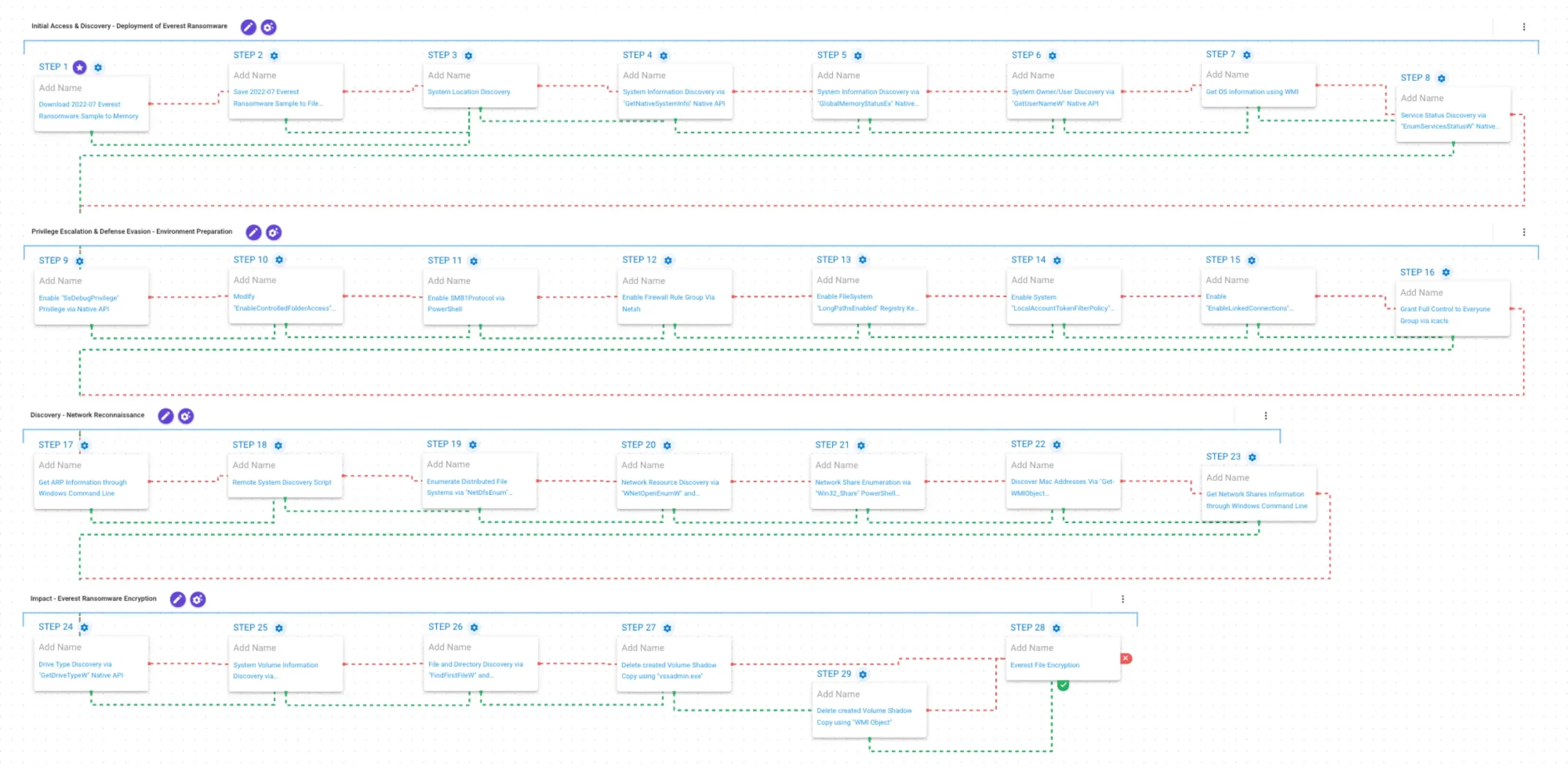
Stage 1: Initial Access & Discovery – Deployment of Everest Ransomware
This stage begins with the deployment of the Everest ransomware binary. It first retrieves the system’s UI culture and locale information. Then, it gathers host and operating system details using the GetSystemInfo and GetNativeSystemInfo APIs, collects memory information through GlobalMemoryStatusEx, and identifies the current user with GetUserNameW. Finally, it queries the Win32_OperatingSystem WMI class for additional operating system information and enumerates installed services through the Windows Service Control Manager API (EnumServicesStatusExW)

Stage 2: Privilege Escalation & Defense Evasion – Environment Preparation
This stage begins by enabling the SeDebugPrivilege privilege through AdjustTokenPrivileges, granting access to protected processes. Everest then disables Controlled Folder Access using Set-MpPreference and enables the SMBv1 protocol via Enable-WindowsOptionalFeature to support network-based operations. Next, it enables the Windows Firewall rules for File and Printer Sharing and Network Discovery using netsh.exe, increasing network visibility and accessibility. Finally, Everest alters multiple Registry settings, including LongPathsEnabled, LocalAccountTokenFilterPolicy, and EnableLinkedConnections, and uses icacls.exe to grant broad filesystem permissions to all users, further reducing restrictions and facilitating access to files and network resources.

Stage 3: Discovery – Network Reconnaissance
In this stage, Everest performs network reconnaissance to identify accessible systems and shared resources. It begins by enumerating ARP cache entries using arp -a, followed by discovering hosts and shared resources through net view. It then identifies distributed file system resources with NetDfsEnum, enumerates network resources via WNetEnumResource, and queries Win32_Share to identify available shares. Finally, it gathers network adapter configuration details through the Win32_NetworkAdapterConfiguration WMI class and uses net use to enumerate or interact with mapped network resources.

Stage 4: Impact – Everest Ransomware Encryption
In this stage, Everest identifies and prepares target data for encryption. It begins by enumerating available drives using GetDriveTypeW and gathering volume information through GetVolumeInformationW. The ransomware then performs filesystem traversal and file enumeration using the FindFirstFileW and FindNextFileW APIs to locate files for encryption.
To inhibit recovery, Everest deletes Volume Shadow Copies using both vssadmin Delete Shadows /all /quiet and Get-CimInstance Win32_ShadowCopy | Remove-CimInstance, preventing victims from restoring data from local snapshots. Finally, it encrypts the identified files using AES-128 for data encryption, with RSA-1024 used to protect the encryption keys.

Opportunities to Expand Emulation Capabilities
In addition to the released assessment template, AttackIQ recommends the following existing scenarios to extend the emulation of the capabilities exhibited in this blog:
Active Network Connection Enumeration via “Win32_NetworkConnection” PowerShell Command: This scenario enumerates active network connections using the Win32_NetworkConnection WMI class to gather information about connected network resources and remote shares.
Mapped Drive Enumeration via “Win32_MappedLogicalDisk” PowerShell Command: This scenario enumerates mapped network drives using the Win32_MappedLogicalDisk WMI class identify mapped shares and remote resources that can be accessed for data collection or lateral movement.
Scope and safety. AttackIQ adversary emulations are built to run safely in live production environments. Accordingly, we deliberately exclude any behavior identified during analysis that is destructive, that affects systems beyond the test host, or that cannot be cleanly reversed. These behaviors are characterized in our analysis but intentionally left out of the emulation, since reproducing them in a customer environment would defeat the purpose of a safe, repeatable test.
Wrap Up
In summary, this emulation will evaluate security and incident response processes and support the improvement of your security control posture against the behaviors exhibited by Everest ransomware. With data generated from continuous testing and use of this assessment template, you can focus your teams on achieving key security outcomes, adjust your security controls, and work to elevate your total security program effectiveness against a known and dangerous threat. AttackIQ is the industry’s leading Continuous Threat Exposure Management (CTEM) platform, enabling organizations to measure true exposure, prioritize risk, and disrupt real-world attack paths. By moving beyond static vulnerability data, AttackIQ operationalizes CTEM by continuously validating exposures against real adversary behavior and defensive controls. The platform connects vulnerabilities, configurations, identities, and detections into adversary-validated attack paths—quantifying the likelihood of attacker movement and impact. This evidence-based approach empowers security leaders to focus on what matters most, optimize defensive investments, and strengthen resilience through threat-informed, AI-driven security operations.
Appendix
Full Command Table
| Phase | Purpose | Command |
| Self-Defense | Disable startup for selected security and backup-related services (SQLTELEMETRY, SQLTELEMETRY$ECWDB2, SQLWriter, SstpSvc, MBAMService) | sc.exe config <service> start= disable |
| Anti-Raccine | Terminate Raccine processes | taskkill /F /IM Raccine.exe taskkill /F /IM RaccineSettings.exe |
| Anti-Raccine | Remove the Raccine scheduled task | schtasks /DELETE /TN “Raccine Rules Updater” /F |
| Recovery Sabotage | Delete backup and virtual disk files matching hardcoded patterns across drives C:–H: | del /s /f /q <drive>:\*.VHD <drive>:\*.bac <drive>:\*.bak <drive>:\*.wbcat <drive>:\*.bkf <drive>:\Backup*.* <drive>:\backup*.* <drive>:\*.set <drive>:\*.win <drive>:\*.dsk |
| Recovery Sabotage | Query operating system information | SELECT * FROM Win32_OperatingSystem |
| Recovery Sabotage | Delete Volume Shadow Copies through WMI | powershell.exe Get-CimInstance Win32_ShadowCopy | Remove-CimInstance |
| Recovery Sabotage | Force deletion of existing shadow copies by shrinking and restoring shadow storage | vssadmin resize shadowstorage /for=c: /on=c: /maxsize=401MBvssadmin resize shadowstorage /for=c: /on=c: /maxsize=unbounded |
| Recovery Sabotage | Delete Volume Shadow Copies (legacy/Windows XP path) | vssadmin Delete Shadows /all /quiet |
| Environment Preparation | Disable Windows Defender Controlled Folder Access | powershell.exe Set-MpPreference -EnableControlledFolderAccess Disabled |
| Environment Preparation | Re-enable the SMB1 protocol | powershell.exe Enable-WindowsOptionalFeature -Online -FeatureName SMB1Protocol |
| Environment Preparation | Enable Network Discovery firewall rules | netsh advfirewall firewall set rule group=”Network Discovery” new enable=Yes |
| Environment Preparation | Enable File and Printer Sharing firewall rules | netsh advfirewall firewall set rule group=”File and Printer Sharing” new enable=Yes |
| Environment Preparation | Relax remote UAC token filtering | reg ADD “HKLM\SOFTWARE\Microsoft\Windows\CurrentVersion\Policies\System” /v LocalAccountTokenFilterPolicy /t REG_DWORD /d 1 |
| Environment Preparation | Enable linked network connections | reg ADD “HKLM\SOFTWARE\Microsoft\Windows\CurrentVersion\Policies\System” /v EnableLinkedConnections /t REG_DWORD /d 1 |
| Environment Preparation | Enable long path support | reg ADD “HKLM\SYSTEM\CurrentControlSet\Control\FileSystem” /v LongPathsEnabled /t REG_DWORD /d 1 |
| Environment Preparation | Grant Everyone full control over the C: drive | icacls “C:*” /grant Everyone:F /T /C /Q |
| Network Discovery | Enumerate recently contacted hosts via the ARP cache | arp -a |
| Network Discovery | Enumerate visible network hosts and shares | net view |
| Network Discovery | Mount discovered network shares | net use \\\\<server>\\<share> |
| Key Generation | Store the RSA-wrapped seed in the registry | reg ADD “HKCU\Software\AppName” /v PublicKey /d <base64 RSA-wrapped seed> |
| Self-Deletion | Delay, wipe, and remove the ransomware binary | cmd.exe /C ping 127.0.0.7 -n 3 > Nul & fsutil file setZeroData offset=0 length=524288 “<self>” & Del /f /q “<self>” |
Targeted Processes
Targeted Processes (Thread 1 – Reverse-Engineering Tool Killer). Raw list extracted directly from the binary.
tcpdump, HTTPNetworkSniffer, NetworkTrafficView, NetworkMiner, NoFuserEx, Universal_Fixer, UnConfuserEx, MegaDumper, pe-sieve, LordPE, protection_id, PEiD, CFF Explorer, RDG Packer Detector, ida64, dotpeek64, dotpeek, ilspy, de4dot, dnspy-x86, dnspy, x32dbg, x64dbg, ollydbg, Intercepter-NG, intercepter, tcpdump, HTTPNetworkSniffer, NetworkTrafficView, http analyzer stand-alone, fiddler, effetech http sniffer, firesheep, IEWatch Professional, dumpcap, wireshark, wireshark portable, sysinternals tcpview, NetworkMiner
Targeted Processes (Thread 2 – Security, Backup, and Database Killer). Raw lists extracted directly from the binary.
mspub, mydesktopqos, mydesktopservice, mysqld, sqbcoreservice, firefoxconfig, agntsvc, thebat, steam, encsvc, excel, CNTAoSMgr, sqlwriter, tbirdconfig, dbeng50, thebat64, ocomm, infopath, mbamtray, zoolz, thunderbird, dbsnmp, xfssvccon, mspub, Ntrtscan, isqlplussvc, onenote, PccNTMon, msaccess, outlook, tmlisten, msftesql, powerpnt, mydesktopqos, visio, mydesktopservice, winword, mysqld-nt, wordpad, mysqld-opt, ocautoupds, ocssd, oracle, sqlagent, sqlbrowser, sqlservr, synctime
Targeted Services
Targeted Services (Thread 2 – Security, Backup, and Database Killer). Raw lists extracted directly from the binary.
klvssbridge64, vapiendpoint, ShMonitor, Smcinst, SmcService, SntpService, svcGenericHost, swi_, TmCCSF, tmlisten, TrueKey, TrueKeyScheduler, TrueKeyServiceHelper, WRSVC, McTaskManager, OracleClientCache80, mfefire, wbengine, mfemms, RESvc, mfevtp, sacsvr, SAVAdminService, SAVService, SepMasterService, PDVFSService, ESHASRV, SDRSVC, FA_Scheduler, KAVFS, KAVFSGT, kavfsslp, klnagent, macmnsvc, masvc, MBAMService, MBEndpointAgent, McShield, audioendpointbuilder, Antivirus, AVP, DCAgent, bedbg, EhttpSrv, MMS, ekrn, EPSecurityService, EPUpdateService, ntrtscan, EsgShKernel, msexchangeadtopology, AcrSch2Svc, MSOLAP$TPSAMA, Intel(R) PROSet Monitoring, msexchangeimap4, ARSM, unistoresvc_1af40a, ReportServer$TPS, MSOLAP$SYSTEM_BGC, W3Svc, MSExchangeSRS, ReportServer$TPSAMA, Zoolz 2 Service, MSOLAP$TPS, aphidmonitorservice, SstpSvc, MSExchangeMTA, ReportServer$SYSTEM_BGC, Symantec System Recovery, UI0Detect, MSExchangeSA, MSExchangeIS, ReportServer, MsDtsServer110, POP3Svc, MSExchangeMGMT, SMTPSvc, MsDtsServer, IisAdmin, MSExchangeES, EraserSvc11710, Enterprise Client Service, MsDtsServer100, NetMsmqActivator, stc_raw_agent, VSNAPVSS, veeam, Veeam, PDVFSService, AcrSch2Svc, Acronis, CASAD2DWebSvc, CAARCUpdateSvc, McAfee, avpsus, DLPAgentService, mfewc, BMR Boot Service, DefWatch, ccEvtMgr, ccSetMgr, SavRoam, RTVscan, QBFCService, QBIDPService, Intuit.QuickBooks.FCS, QBCFMonitorService, YooIT, zhudongfangyu