Chaos is a ransomware family originally introduced in June 2021 by the developer of the Bagli ransomware through the release of the C#-based Chaos ransomware builder. It rapidly gained popularity within the cybercriminal ecosystem, spawning numerous derivative ransomware families.
The ransomware underwent rapid development during its first months of existence, progressing from v1, released on June 9, 2021, through v4, released on August 5, 2021. Early releases (v1 and v2) functioned as wipers inherited from the Bagli codebase, permanently overwriting files rather than encrypting them. Beginning with v3, Chaos transitioned into a functional ransomware framework that ultimately became the foundation for several independent ransomware operations.
Multiple ransomware families subsequently adopted and modified the Chaos codebase. In April 2022, the Onyx ransomware group began deploying a Chaos v4 fork before replacing its cryptographic implementation while retaining much of the original framework. During the same period, the Yashma/AstraLocker ransomware strain emerged from the main Chaos branch before ceasing operations in July 2022. In August 2022, the Solidbit ransomware operation introduced another Chaos-based fork, implementing its own encryption routine and heavier obfuscation while preserving substantial similarities to the original malware.
In February 2025, Chaos re-emerged as a Ransomware-as-a-Service (RaaS) operation featuring a substantially redesigned C++ ransomware variant. In addition to file encryption and double-extortion tactics, it incorporated destructive capabilities and clipboard hijacking to facilitate cryptocurrency theft. Since then, operators have promoted the cross-platform ransomware on the Russian-speaking Ransom Anon Market Place (RAMP) forum, recruiting affiliates and providing an automated management panel for victim administration, payload deployment, and negotiation management.
Researchers assess with moderate confidence that the operation is led by former members of the BlackSuit, also known as Royal, ransomware group, based on similarities in encryption methodology, ransom note structure, and operational tooling.
The operators employ a multi-stage intrusion methodology that begins with email flooding and voice phishing to obtain initial access through Microsoft Quick Assist. Following compromise, the operators deploy Remote Monitoring and Management (RMM) tools, including AnyDesk, ScreenConnect, OptiTune, Syncro RMM, and Splashtop, to establish persistent remote access. They subsequently perform lateral movement using Remote Desktop Protocol (RDP), before exfiltrating data with GoodSync disguised as a legitimate Windows executable and ultimately deploying the Chaos ransomware payload.
AttackIQ has released a new attack graph that emulates the Tactics, Techniques, and Procedures (TTPs) associated with the deployment of Chaos ransomware to help customers validate their security controls and their ability to defend against this disruptive and destructive threat.
Validating your security program performance against these behaviors is vital in reducing risk. By using these new attack graphs in the AttackIQ Security Optimization Platform, security teams will be able to:
- Evaluate security control performance against baseline behaviors associated with the Chaos ransomware.
- Assess their security posture against an opportunistic adversary, which does not discriminate when it comes to selecting its targets.
- Continuously validate detection and prevention pipelines against a playbook similar to those of many of the groups currently focused on ransomware activities.
Chaos Ransomware – 2025-08 – Payload Execution Chain
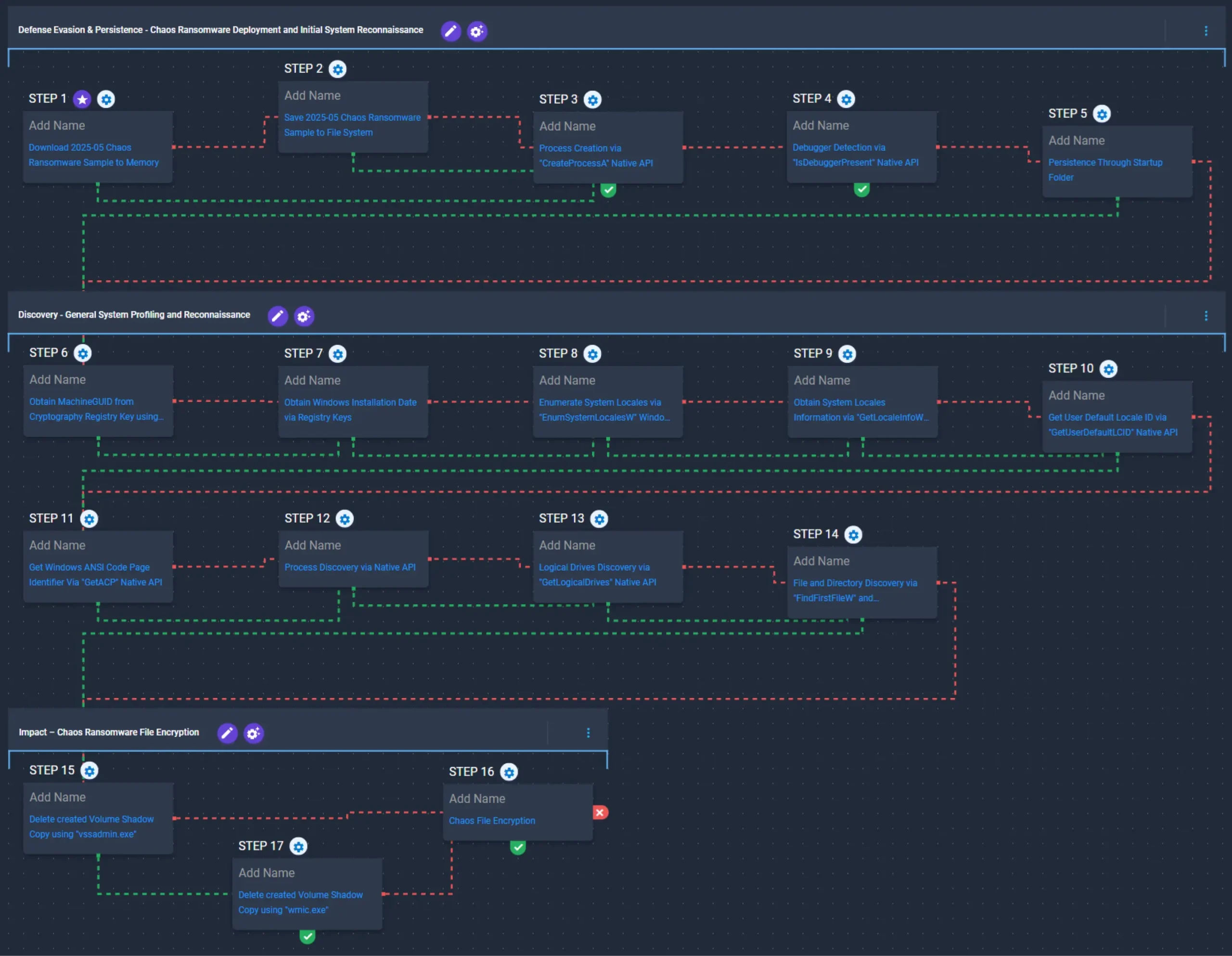
This emulation replicates the sequence of behaviors associated with the deployment of Chaos ransomware on a compromised system with the intent of providing customers with the opportunity to detect and/or prevent a compromise in progress.
This emulation is based on behaviors reported by Trend Micro on August 10, 2021, Truesec on December 12, 2022, Qualys on December 21, 2022, Cisco Talos on July 24, 2025, and Fortinet on October 8, 2025.
Defense Evasion & Persistence – Chaos Ransomware Deployment and Initial System Reconnaissance

This stage begins with the deployment of Chaos ransomware, which is executed through the CreateProcessA API. Once operational, the ransomware performs debugger detection by executing the IsDebuggerPresent API before attempting to establish persistence by creating a shortcut in the Startup folder.
Ingress Tool Transfer (T1105): This scenario downloads to memory and saves to disk in independent scenarios to test network and endpoint controls and their ability to prevent the delivery of known malicious samples.
Process Creation via “CreateProcessA” Native API (T1106): This scenario executes the CreateProcessA Windows API call to create a new process for a given executable payload.
Virtualization/Sandbox Evasion (T1497): This scenario will execute the IsDebuggerPresent Windows API to detect the presence of a debugger attached to the current process.
Logon Autostart Execution: Registry Run Keys / Startup Folder (T1547.001): This scenario creates an LNK file in the Startup folder that would execute at the next Logon for all users.
Discovery – General System Profiling and Reconnaissance
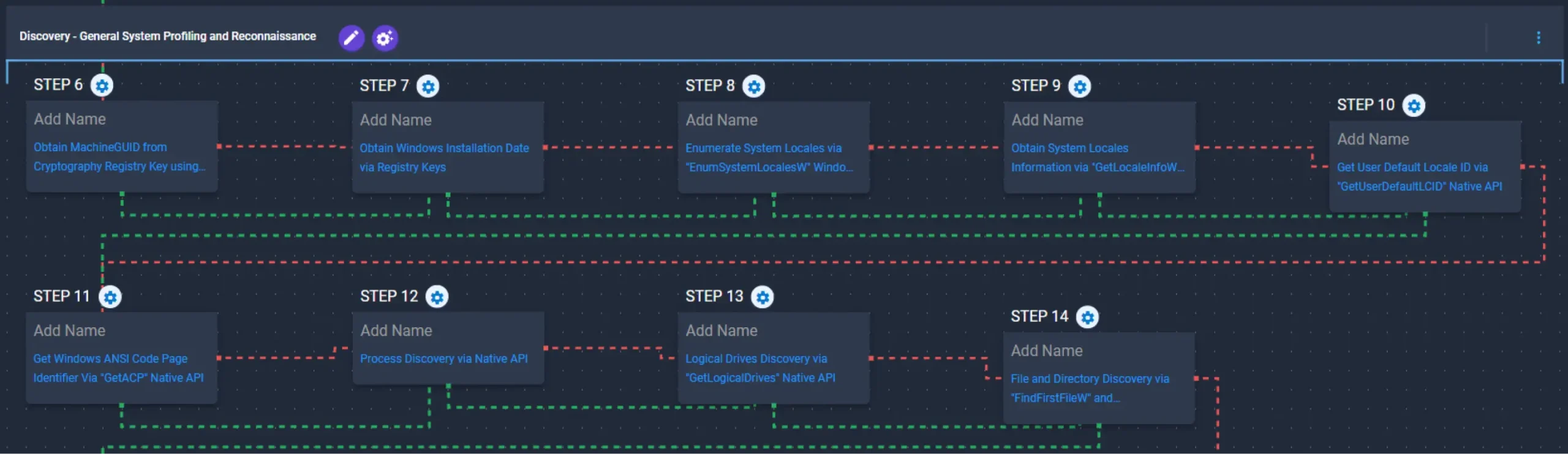
This stage focuses on system profiling and reconnaissance, beginning by retrieving the MachineGUID and InstallDate values from the Windows registry. It then attempts to infer the system location using the EnumSystemLocalesW, GetLocaleInfoW, GetUserDefaultLCID, and GetACP APIs. Subsequently, it enumerates running processes through the CreateToolhelp32Snapshot, Process32FirstW, and Process32NextW APIs. Finally, it enumerates logical drives using the GetLogicalDrives API before traversing the file system through the FindFirstFileW and FindNextFileW APIs.
Obtain MachineGUID from Cryptography Registry Key using “reg query” Command (T1012): This scenario queries the MachineGUID value located within the HKLM\SOFTWARE\Microsoft\Cryptography registry key which contains the unique identifier of the system.
Obtain Windows Installation Date via Registry Keys (T1012): This scenario queries the InstallDate value located within the HKLM \SOFTWARE\Microsoft\Windows NT\CurrentVersion registry key which contains the Windows installation date.
Enumerate System Locales via “EnumSystemLocalesW” Windows API (T1614): This scenario executes the EnumSystemLocalesW Windows API to enumerate the locales installed on or supported by the operating system.
Obtain System Locales Information via “GetLocaleInfoW” Windows API (T1614): This scenario executes the GetLocaleInfoW Windows API to retrieve the user’s default country locale code from the system.
Get User Default Locale ID via “GetUserDefaultLCID” Native API (T1614): This scenario executes the GetUserDefaultLCID Windows API to retrieve the user default locale ID from the system.
Get Windows ANSI Code Page Identifier Via “GetACP” Native API (T1614): This scenario executes the GetACP Windows API to retrieve the current Windows ANSI code page identifier for the operating system.
Process Discovery (T1057): This scenario uses Windows API to receive a list of running processes by calling CreateToolhelp32Snapshot and iterating through each process object with Process32FirstW and Process32NextW.
Logical Drives Discovery via “GetLogicalDrives” Native API (T1680): This scenario executes the GetLogicalDrives Windows API to retrieve the currently available disk drives.
File and Directory Discovery (T1083): This scenario will call the FindFirstFileW and FindNextFileW Windows API to perform the enumeration of the file system.
Impact – Chaos Ransomware File Encryption
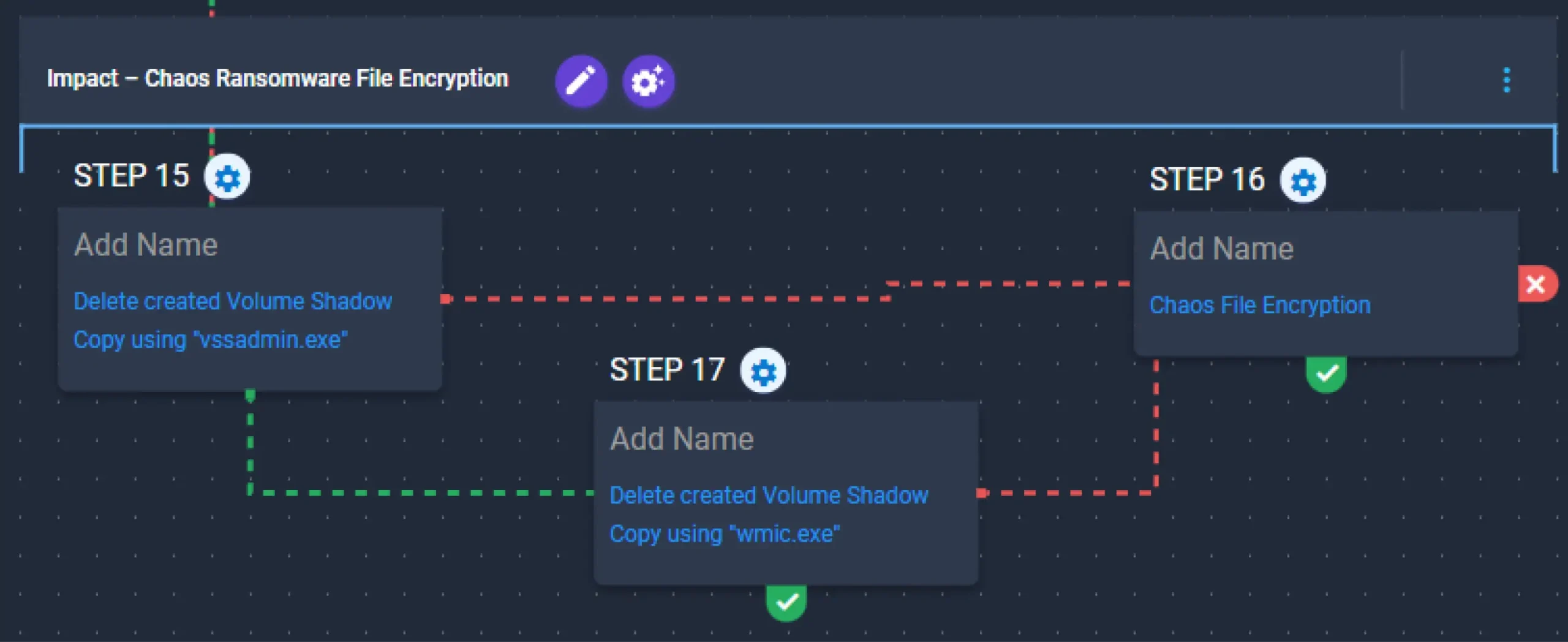
This stage begins by attempting to delete Volume Shadow Copies via vssadmin.exe. If the attempt fails, it falls back to wmic.exe. Once completed, it encrypts the previously identified files using a combination of AES-256 in CFB mode for file encryption with RSA-1024 for key encryption.
Delete created Volume Shadow Copy using “vssadmin.exe” (T1490): This scenario executes the vssadmin.exe utility to delete a Volume Shadow Copy created by the emulation.
Delete created Volume Shadow Copy using “wmic.exe” (T1490): This scenario executes the wmic shadowcopy delete command to delete a Volume Shadow Copy created by the emulation.
Chaos File Encryption (T1486): This scenario performs the file encryption routines used by common ransomware families. Files matching an extension list are identified and encrypted in place using similar encryption algorithms as used by Chaos ransomware.
Wrap-up
In summary, this emulation will evaluate security and incident response processes and support the improvement of your security control posture against the behaviors exhibited by Chaos ransomware. With data generated from continuous testing and use of this assessment template, you can focus your teams on achieving key security outcomes, adjust your security controls, and work to elevate your total security program effectiveness against a known and dangerous threat.
AttackIQ is the industry’s leading Continuous Threat Exposure Management (CTEM) platform, enabling organizations to measure true exposure, prioritize risk, and disrupt real-world attack paths. By moving beyond static vulnerability data, AttackIQ operationalizes CTEM by continuously validating exposures against real adversary behavior and defensive controls. The platform connects vulnerabilities, configurations, identities, and detections into adversary-validated attack paths—quantifying the likelihood of attacker movement and impact. This evidence-based approach empowers security leaders to focus on what matters most, optimize defensive investments, and strengthen resilience through threat-informed, AI-driven security operations.